

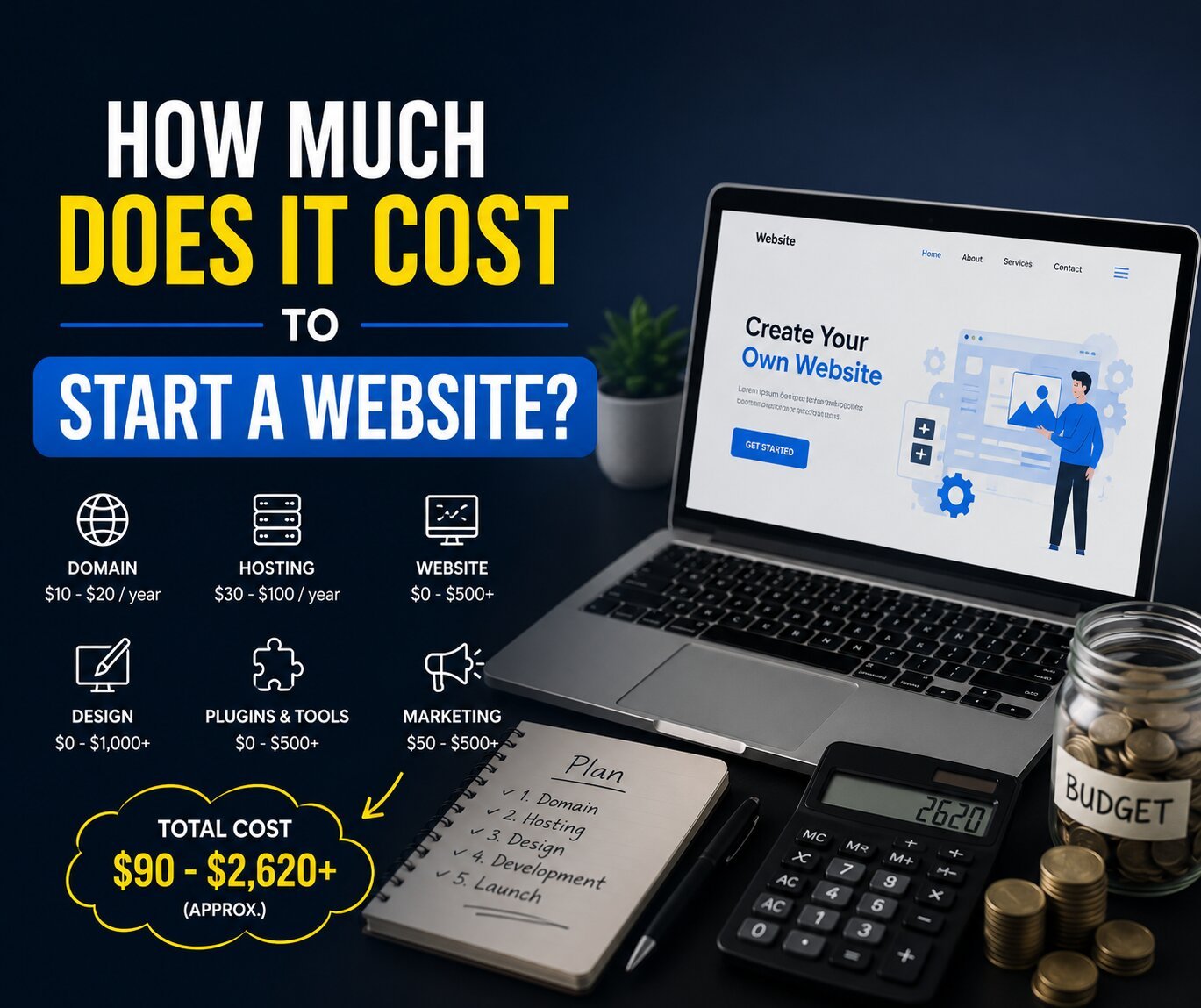
Starting a website costs $50–$250 per year for a basic DIY blog or personal site, $300–$1,500 for a small business presence, and $2,000–$10,000+ for a custom-designed or ecommerce site. The core costs are a domain name ($10–$20/year), web hosting ($24–$120/year for shared hosting), and an SSL certificate (free on most hosts). Everything beyond that depends on your goals, platform choice, and whether you build it yourself or hire someone. Full breakdown with honest numbers below.
Most website cost guides either wildly undersell the true cost by quoting intro pricing that doubles at renewal, or oversell it by leading with agency-level numbers that have nothing to do with what most people actually need. This guide covers every cost layer honestly — from a free blog to a fully custom business site — so you can budget accurately before spending a dollar.
The Core Building Blocks Every Website Needs
Before getting into scenarios, it helps to understand the five cost components that make up every website budget. Everything you’ll spend traces back to one of these categories.
1. Domain Name
Cost: $10–$20/year (standard .com); $20–$60 for premium TLDs
Your domain is your website’s address — yoursite.com. You don’t buy it outright; you lease it annually from a domain registrar like Namecheap, Google Domains, or GoDaddy.
A few things to know:
- Most registrars offer the first year at a discount — sometimes as low as $1–$5. The renewal rate (what you pay year two onward) is the real price. Check it before registering.
- WHOIS privacy protection (which hides your personal contact details from public domain lookup) adds $0–$15/year, though many registrars now include it free.
- Premium domains with popular keywords can cost hundreds or thousands of dollars. Unless you’re buying an established domain for SEO value, this is rarely worth it for a new site.
2. Web Hosting
Cost: $24–$96/year (shared); $180–$420/year (managed WordPress); $72–$480+/year (VPS)
Hosting is the server where your website’s files live. It’s the most variable cost in your budget and the one where people most often make expensive mistakes.
| Hosting Type | Best For | Annual Cost |
|---|---|---|
| Shared hosting | Personal sites, blogs, small business | $24–$96/year |
| Managed WordPress | WordPress sites with growth plans | $180–$420/year |
| VPS hosting | High-traffic or custom server needs | $72–$480+/year |
| Website builder (all-in-one) | Non-technical users | $144–$720/year |
The critical trap: many hosting companies advertise low intro rates around $3/month that increase significantly at renewal. Always check the renewal price — not the promotional price — before committing to a multi-year plan.
3. SSL Certificate
Cost: Free–$200+/year (most people pay $0)
SSL is the security protocol that puts the padlock in your browser’s address bar and changes your URL from http:// to https://. Google treats it as a basic ranking signal, and browsers flag non-SSL sites as insecure.
The good news: almost every major hosting provider now includes a free SSL certificate through Let’s Encrypt. Unless you’re running a large ecommerce site that requires an extended validation (EV) certificate for additional trust signals, the free SSL is perfectly sufficient.
4. Platform / CMS
Cost: $0 (WordPress, self-hosted) to $720/year (premium website builders)
Your platform is the software that powers your site. The two main categories are:
- Self-hosted WordPress (wordpress.org): The platform itself is free. You pay for hosting and a domain separately. Roughly 43% of all websites on the internet run on WordPress. It requires more technical involvement than a website builder but offers far more flexibility and no platform lock-in.
- Website builders (Squarespace, Wix, Shopify): All-in-one platforms that bundle hosting, templates, and CMS into a monthly subscription. Easier to start, less flexible long-term, and you don’t own the platform.
5. Design and Theme
Cost: $0 (free themes) to $199/year (premium themes); $500–$10,000+ for custom design
If you’re using WordPress, thousands of free themes are available. Premium themes from marketplaces like ThemeForest or Elegant Themes run $50–$199 as a one-time or annual purchase. Page builders like Elementor or Divi add $49–$89/year and let non-developers build professional layouts without code.
Professional web design from a freelancer starts at around $1,500 for a small business site and scales up from there based on scope and experience.
Real Cost Scenarios by Website Type
Personal Blog or Portfolio Site — $50–$200/year
If you’re building a personal blog, resume site, or creative portfolio and you’re comfortable doing it yourself, your costs are minimal.
Typical annual budget:
- Domain: $12–$15
- Shared hosting (Hostinger, SiteGround, or Bluehost): $24–$60
- Free WordPress theme or Astra free: $0
- SSL: $0 (included with host)
- Total year one: $36–$75
This is genuinely achievable. The trade-off is time — you’ll need to learn the basics of WordPress, install a theme, and handle your own setup and troubleshooting.
Small Business Website — $300–$1,500/year (DIY to hybrid)
A small business site typically needs five to ten pages (home, about, services, contact), a contact form, basic SEO setup, and a professional design that reflects the brand.
Typical annual budget (DIY WordPress):
- Domain: $15
- Managed or quality shared hosting: $100–$180
- Premium theme or page builder: $49–$99
- SEO plugin (Yoast or Rank Math free tier): $0
- Contact form plugin: $0–$49
- Email hosting (Google Workspace): $72/user/year
- Total year one: $236–$415
If you hire a freelancer for the initial build and then manage it yourself, add a one-time cost of $1,500–$5,000 for design and development.
Ecommerce Website — $1,000–$10,000+ (setup); $500–$3,000/year ongoing
Online stores carry the highest setup and ongoing costs because of the additional infrastructure required — payment processing, product management, inventory, security, and performance under traffic load.
Platform options and their cost implications:
- Shopify: Starts at $29/month ($348/year) for basic, plus 2.9% + $0.30 per transaction on external payment gateways. All-in-one with no hosting to manage separately. Best for straightforward retail.
- WooCommerce (WordPress plugin): The plugin is free, but you’ll need faster hosting ($100–$300/year) and likely premium extensions for subscriptions, advanced shipping, or memberships.
- Squarespace Commerce: $28–$52/month, includes hosting and SSL. Simpler than WooCommerce, fewer customization options.
Payment processing fees apply regardless of platform — typically 2.9% + $0.30 per transaction through Stripe or PayPal. These aren’t charged by the platform but they are a real cost of running an online store.
Custom-Built Website — $5,000–$50,000+ (one-time)
Custom websites designed and developed by a professional agency or senior freelancer are appropriate for businesses with specific functional requirements, large content libraries, or the need for a distinctive brand experience that templates can’t provide.
A web designer may charge $500 to $10,000+ for many small business projects depending on experience, scope, and customization. Professional design for a small business website often starts around $1,500, while larger custom projects cost considerably more.
Ongoing maintenance for professionally built sites adds $50–$500+/month for a managed maintenance contract covering updates, security, backups, and technical support.
Hidden Costs That Catch People Off Guard
These are the website expenses most guides don’t mention upfront — and they’re the ones that cause the most budget surprises.
Plugin and tool subscriptions: Premium plugins for contact forms, SEO, backup, security, caching, and popup tools each charge $49–$199/year individually. They stack up fast. Audit your plugins every renewal cycle and cut anything you’re not actively using.
Platform migration costs: If you start on a cheap shared host and need to move to a better platform later, platform migrations cost $700 to $6,000 depending on site size. Picking the right hosting environment from the start is genuinely worth the research.
Content creation: A website with no content is invisible. Professional copywriting runs $50–$500 per page. Professionally written blog posts run $100–$300 each. If you’re writing content yourself, this is a time cost, not a money cost — but it’s real.
Email marketing tools: If you’re building a list, tools like Mailchimp, ConvertKit, or Brevo are free up to a certain subscriber count, then scale with your list. Budget $0–$348+/year depending on your list size and sending frequency.
Legal and compliance: Cookie consent banners, privacy policies, and terms of service are required for most commercial websites under GDPR, CCPA, and other regional laws. Legal compliance tools or professionally drafted policies add $0–$300/year.
What to Prioritize When Budgeting
If your budget is tight, here’s how to prioritize spending to get the most functional site for the least money:
- Spend on a good domain. Your domain name reflects your brand. A .com in your actual business name is worth paying for — don’t compromise here to save $5.
- Don’t buy the cheapest hosting. Cheap shared hosting with unreliable uptime costs you in lost traffic and frustration. A mid-tier shared host from a reputable provider (SiteGround, Hostinger, Kinsta for WordPress) is worth the premium over bargain-basement options.
- Use free tools first. WordPress itself, the Astra free theme, Rank Math free SEO plugin, and Google Search Console cover the majority of what a new site needs at zero cost.
- Invest in content over design. A well-written, clearly structured site on a free theme outperforms a beautifully designed site with no content every time, especially in search rankings.
- Plan for renewals from day one. Map every recurring expense before you commit to a build method. Hosting, domain, SSL, and plugins all renew annually — know the real year-two cost before year one ends.
Total Cost Summary at a Glance
| Website Type | DIY Annual Cost | With Pro Help (One-Time) |
|---|---|---|
| Personal blog / portfolio | $36–$200/year | $500–$1,500 setup |
| Small business (5–10 pages) | $236–$415/year | $1,500–$5,000 setup |
| Ecommerce store | $500–$1,500/year | $3,000–$15,000 setup |
| Custom designed site | $500–$3,000/year | $5,000–$50,000+ setup |
Final Thought: Match Your Budget to Your Goals
A $60/year WordPress site is entirely adequate for a personal blog or freelancer portfolio. A $400/year DIY WordPress business site is entirely adequate for most local service businesses. The question is not how little you can spend — it is whether what you spend matches what you need the site to actually do.
The most expensive website mistake is not overpaying. It is underpaying for something that can’t do the job, then paying again to rebuild it properly six months later.